Project Overview – Architecture & Features
This page gives a high-level view of Nadine’s architecture and major features.
System Architecture
Nadine is organized into three main components that communicate via MQTT:
1. Control Component (control/)
Handles robot physical control, animations, and speech synthesis:
- Robot joint control and animations (XML-based).
- Azure Text-to-Speech (TTS) integration.
- Serial communication with robot hardware.
- Head/eye movement control (look-at functionality).
- Lip-sync animation generation.
2. Interaction Component (interaction/)
Multi-agent dialogue system built with LangGraph:
- Intent classifier (
graph.py) – labels each turn (greeting, user info, farewell, language change, continue). - Orchestrator (
orchestration_agent.py) – plans which tool agents to call. - Response agent (
response_agent.py) – generates the reply with emotional tone. - Search agent (
search_agent.py) – real-time web information retrieval. - Knowledge RAG agent (
knowledge_RAG_agent.py) – retrieves from Nadine’s knowledge base. - Vision agent (
vision_agent.py) – describes the current camera view. - Memory agents (
memory_update_agent.py,memory_retrieval_agent.py) – store and retrieve user profiles, episodes, and visual memories. - Contextualizer (
context_summarizer.py) – summarizes the conversation history for the orchestrator. - Affective system (
affective_system.py) – PAD emotional state, appraised and updated each turn. - Dialogue manager (
dm.py) – drives the graph and the MQTT handshake with the other layers. - Speech-to-text (Google Cloud Speech) and a Tkinter monitoring UI.
- Multi-language support; the default language is French.
Most agents use fine-tuned Qwen2.5-1.5B models. Each one is a LoRA adapter trained per agent role, merged into the base model, converted to a quantized GGUF file (Q4_K_M), and registered in Ollama as a nadine-* model, so all local inference goes through one Ollama server. The response agent uses Mistral Small 3.2 (24B) via Ollama for higher-quality generation. The loader also supports a vLLM backend (backend: vllm on a profile), but no profile uses it in this version.
3. Perception Component (perception/)
Computer vision and face recognition:
- RealSense camera integration (RGB + depth).
- Face detection using YOLOv8.
- Face recognition using InsightFace.
- 3D position tracking for look-at control.
- User profile management with face embeddings.
System Workflow
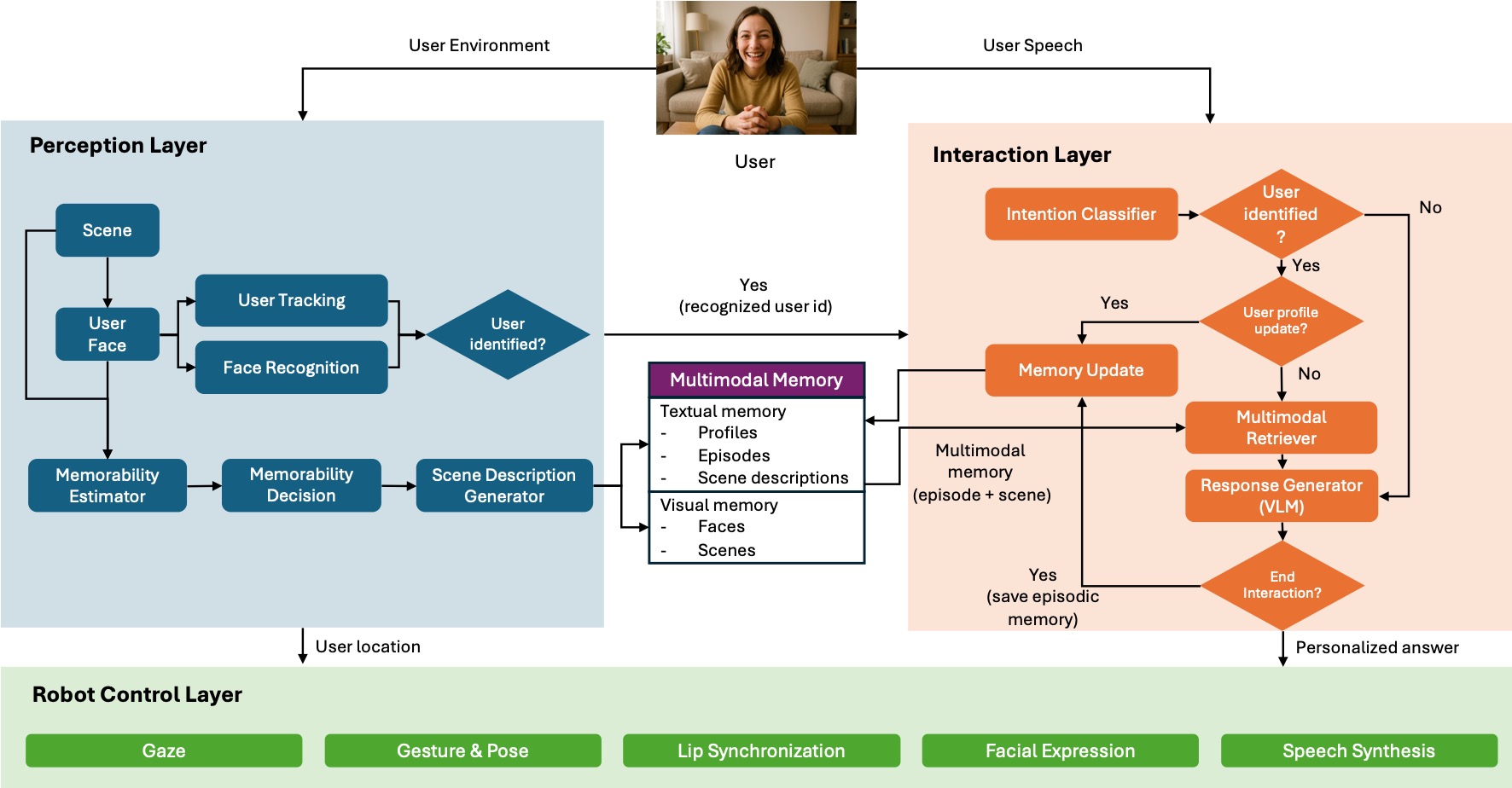
The following diagram summarizes how components and agents interact:
At a high level:
- Perception detects and recognizes users, publishes identity and 3D position.
- Interaction receives user speech and visual context, runs the multi-agent graph.
- Control executes speech and animations based on interaction commands.
See the dedicated Perception, Interaction, and Control layer docs for details.
Project Structure
Simplified directory layout:
nadine_local/
├── control/                    # Robot control and animations
│   ├── main.py                 # Control server entry point (loads control/.env)
│   ├── config.yaml             # Animation path, TTS provider
│   ├── checker.ini             # Serial port and joint channel table
│   ├── nadine/control/         # NadineServer, NadineControl, AzureTTS, Checker, ...
│   └── XMLAnimations/          # Animation XML files
│
├── interaction/                # Multi-agent dialogue system
│   ├── config.yaml             # LLM profiles, agent mapping, visual-memory thresholds
│   ├── nadine/agents/          # LangGraph graph and agents
│   ├── nadine/common/          # MQTT, language, translation, logging
│   ├── nadine/stt/             # Google speech-to-text
│   ├── nadine/ui/              # Tkinter monitoring UI
│   ├── db/                     # Knowledge and memory stores, user profiles, images
│   └── google.json             # Google Cloud service-account key
│
├── perception/                 # Computer vision
│   ├── main.py                 # Face recognition main loop
│   ├── selective_memory.py     # Memorability policies and scene storage
│   ├── config.yaml             # Camera, YOLO, and memory settings
│   ├── models/                 # YOLOv8 face model
│   └── weights/                # OpenFace weights
│
├── experiments/finetune/       # LoRA training, adapters, Ollama export
├── models/                     # Shared model files
├── scripts/                    # Zoom audio setup and teardown
├── docs/                       # API key guide and session notes
├── compose.yaml                # Docker Compose for EMQX and the MQTT monitor
├── start_nadine.sh             # Main startup script
└── start_nadine_chatmode.sh    # Text-mode startup script
GPU Allocation
The system runs on 2× NVIDIA RTX 4090 GPUs:
| GPU | Component | Models |
|---|---|---|
| GPU 0 | Perception | YOLOv8, InsightFace, OpenFace, CLIP, Moondream2 |
| GPU 1 | Ollama (interaction LLMs) | Mistral Small 3.2 (response), the fine-tuned nadine-* models, Qwen2.5-1.5B-Instruct, Qwen2.5-VL:3B (vision) |
The placement is not set per process. The Ollama service runs with CUDA_VISIBLE_DEVICES=1,0 and OLLAMA_MAX_LOADED_MODELS=10, so it fills GPU 1 first, and start_nadine.sh pre-warms the Ollama models before perception starts so that perception finds free memory on GPU 0. The vision model is pre-warmed after perception, in the space that remains on GPU 1.
Key Features
Multi-Agent System (Interaction Layer)
The interaction component uses LangGraph to orchestrate multiple specialized agents:
- Orchestration – decides which agents to call.
- Search – real-time web information retrieval.
- Knowledge RAG – access to Nadine’s internal knowledge base.
- Vision – image understanding and scene analysis.
- Memory – persistent user profile and episodic memory management.
- Response – context-aware, emotionally intelligent replies.
Face Recognition & Gaze (Perception + Control)
- Real-time face detection and tracking.
- User identification with confidence scoring.
- Automatic face storage for new users.
- 3D position tracking to drive natural gaze and head movements.
Multi-Language Support
- Automatic language detection and translation.
- Language-specific TTS voices.
- Languages are defined in the
Languageenum (interaction/nadine/common/language.py): English, French, Arabic, Spanish, Russian, Mandarin, Cantonese, Dutch, German, Italian, Hindi, Japanese, Korean, and Portuguese. The default language is French.
Memory System
- User profile management (
user_info.jsonper user). - Conversation history and episodic memories stored in ChromaDB (local ONNX MiniLM embeddings).
- Visual memory (memorable scenes) linked to user IDs.
Affective System
- PAD (Pleasure–Arousal–Dominance) emotional model.
- Emotion-aware response generation.
- Dynamic mood and emotion updates per interaction.
Multimodal Memory Framework
Nadine implements a multimodal memory framework that tightly couples perception and interaction:
- Selective visual memory (perception)
- The perception layer decides every few seconds whether the current scene is worth remembering. The default policy (
policy: pad_arousalinperception/config.yaml) uses the robot’s own emotional state, published by the interaction layer onnadine/affect/state: the memorability score is an emotion-specific arousal weight times the emotion intensity, compared witharousal_threshold, and a user’s first meeting is always stored. The fallbackvisionpolicy scores the frame itself, combining OpenFace emotion salience with CLIP novelty against the user’s past scenes. -
Stored scenes are saved under the user’s profile as RGB images, CLIP embeddings, and JSON metadata with a Moondream2 scene description.
-
Textual & episodic memory (interaction)
-
The interaction layer stores:
- Conversation snippets and episodic summaries in a per-user Chroma collection.
- Structured user profiles in
user_info.jsonanduser_ids.json.
-
Hybrid retrieval (interaction)
- For a new user query, the memory agents:
- Query Chroma for the most relevant conversation and episode documents.
- Use CLIP text embeddings to find the most relevant visual memory (image) for that user.
- Apply configurable thresholds and weights (image vs. description similarity) from
interaction/config.yaml.
- The best matching visual memory (if any) is passed to the response LLM as an attached image, alongside textual memories and RAG results.
Together, this allows Nadine’s responses to be grounded in what was seen, what was said, and who the user is, rather than relying on text alone.
Research & Applications
Nadine has been used in various research and real-world contexts:
- Customer service (AIA Singapore).
- Elderly care and companionship.
- Public demonstrations and conferences.
- Human-robot interaction research.
- AI-for-Good initiatives.