Interaction Layer – Agents & Graph
This page documents the multi-agent graph that powers Nadine’s dialogue, how each agent behaves, and how they are wired together using LangGraph.
Overview of the Agent Graph (graph.py)
The core of the interaction layer is a LangGraph StateGraph defined in nadine/agents/graph.py.
Key components:
- CustomState (
state_schema.py): -
Holds:
messages(chat history),intent,languageuser_info(ID, name, profile),name_confirmation,name_checkedaffect(personality, emotion, mood, params)conversation_memory,episode_memory,visual_memorysearch_results,vision_results,knowledge_retrievalassistant_note(memory update status text)plan_steps(orchestrator plan)final_message(response text)first_greeting_done,greeted_user_id(greeting bookkeeping)
-
Top-level nodes (node name, followed by the function that implements it):
intention_classifier(classify_intent)memory_update_agent(update_memory) andmemory_retrieve_agent(retrieve_memory): ChromaDB-backed textual memory plus CLIP-backed visual memoryaffective_appraisal(affective_appraisal) andaffective_update(affective_update)orchestrator(orchestrate)- Tool agents:
search_agent(get_search_results),vision_agent(get_vision_results),knowledge_rag_agent(get_knowledge_retrieval) -
response_agent(get_final_response) -
Execution entry:
build_agent_graph()returns a compiled workflow used byDialogueManager.
Intent Classifier
Function: classify_intent(state: CustomState) -> CustomState
Responsibilities:
- Reads the latest user message from
state["messages"][-1].content. - Uses a fine-tuned LLM (via
load_agent_llm("intention_classifier"), thenadine-intent_classifierOllama model) to classify the message into one of: first_greetingupdate_user_infoend_conversationlanguage_changecontinue_conversation
Special behavior:
- If
language_changeis detected, tries to infer the requested language from the message content, updatesstate["language"]and the persisted runtime language, then collapses intent back tocontinue_conversation. - If
state["name_confirmation"]containssimilar_namesandname_checkedisFalse, forcesintent = "update_user_info"so memory update logic can resolve the name.
Post-classification overrides
After the model's label is validated, deterministic rules correct the cases the classifier gets wrong most often:
first_greetingbecomesupdate_user_infowhen the message contains a name introduction ("I'm Alex", "my name is", "call me"), so the memory update agent can extract the name. If no real name is found the agent stores nothing, so false positives are harmless.update_user_infobecomescontinue_conversationwhen the message is a question about Nadine ("tell me about yourself", "who are you").end_conversationbecomescontinue_conversationunless the message contains an explicit farewell word ("bye", "see you", "have to go now"), so future plans such as "I'm going to Paris" do not end the conversation.first_greetingis only accepted once per user:first_greeting_doneandgreeted_user_idare set the first time, and a repeated greeting from the same user is downgraded tocontinue_conversation. When no user ID is known, greetings are never suppressed.
Graph wiring:
- From
START→intention_classifier. - Conditional edges:
- To
memory_update_agentifintent == "update_user_info". - Otherwise to
memory_retrieve_agent.
Memory Retrieval & Update Agents
Memory Retrieval (memory_retrieve_agent)
Function: retrieve_memory(state: CustomState) -> CustomState
- If memory agents are disabled (
NADINE_ENABLE_MEMORY_AGENTS=0), logs and returns immediately. - Retrieval only runs for a known user: if
user_info.user_nameis missing or"Unknown", the node returns the state unchanged. - Otherwise:
- Calls
get_user_specific_memory(state)frommemory_retrieval_agent.py:- Loads user profile from disk (
user_info.json). - Queries ChromaDB for:
- Best matching episode memory (events).
- Best matching conversation memory (past exchanges).
- Queries visual memory (memorable scenes) using CLIP similarity.
- Loads user profile from disk (
- Updates:
state["user_info"]state["conversation_memory"]state["episode_memory"]state["visual_memory"]
Graph wiring:
- From
intention_classifierormemory_update_agent(depending on conditions). - Next:
affective_appraisal→orchestrator.
Memory Update (memory_update_agent)
Function: update_memory(state: CustomState) -> CustomState
Wrapper around memory_update_agent(state) in memory_update_agent.py.
Behaviors:
- If memory agents are disabled, returns immediately.
- Skips update if name confirmation is still pending.
- Builds a
mem_statewith: messages,user_info,intent,name_checked.- Calls
memory_update_agent(mem_state)to: - Extract user profile fields from conversation (name, company, location, hobbies, interests).
- Save/update
user_info.jsonanduser_ids.json. - On
end_conversation, summarize and save episodic memory to ChromaDB. - Merges results back into
state: user_info,name_checked,name_confirmation,episodic_memoryflags, etc.- If
name_checkedanduser_infoare valid: - Sends name and ID to perception via:
mqtt_comm.send_user_info_to_face_recognition(user_name, user_id)
Graph wiring:
- Conditional edge from
intention_classifier:update_user_info→memory_update_agent. - From
memory_update_agent: - If
name_confirmationpresent →response_agent(ask the user to confirm). - If
intent == "end_conversation"→END. - Else →
memory_retrieve_agent(normal flow).
Name confirmation flow (high-level)
The name confirmation logic is split between the memory update agent and the DialogueManager:
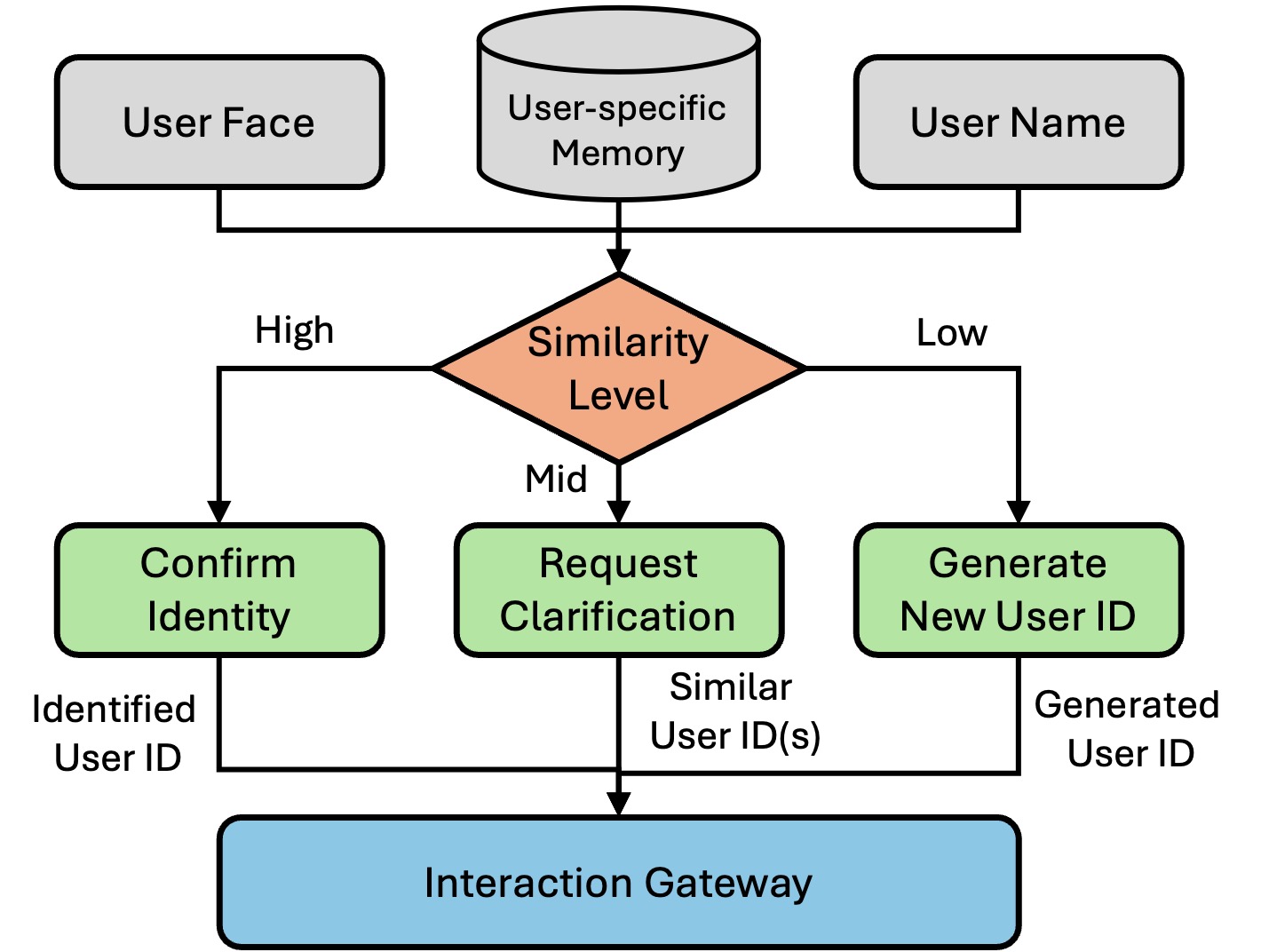
- User shares their name (e.g., “My name is Alex”):
- The intent classifier sets
intent = "update_user_info". memory_update_agentextractsuser_name="Alex"and compares it against names inuser_ids.jsonusing fuzzy matching.- Four possible outcomes from
save_user_info: - Strong match (score ≥
HIGH_SIMILARITY_THRESHOLD):- Immediately link to the existing profile for that user ID.
- Return updated
user_infoandname_checked=Truewith noname_confirmation.
- Ambiguous match (between
LOW_SIMILARITY_THRESHOLDandHIGH_SIMILARITY_THRESHOLD):- Return a
name_confirmationpayload with: given_name,similar_names,similar_ids,similarity_scores.- The graph routes to
response_agent, which asks the user to confirm the top suggested name (e.g., “Is your name Alice?”).
- Return a
- No match (below
LOW_SIMILARITY_THRESHOLD):- Proceed as a new user; create/update a profile with
user_nameand markname_checked=True.
- Proceed as a new user; create/update a profile with
- Identity conflict: face recognition already loaded a known user (say "Alex") but the person states a different, unmatched name ("Han").
- A new user ID is generated for the stated name instead of overwriting Alex's profile.
- User answers the confirmation question:
- On the next turn,
DialogueManager.name_confirmation(user_input)inspectsstate["name_confirmation"]and the user’s reply:- If the user says “yes / correct / that’s me”, the top candidate user ID is accepted and the full stored profile is loaded.
- If the user clearly states a different name (e.g. “No, I’m Alice Smith”), a new profile is created/updated for that name.
- If only one candidate remains and the user doesn’t explicitly confirm, the
given_namemay be taken as the new canonical name. - Otherwise, the candidate list is rotated (pop the first suggestion) and another confirmation question will be asked later.
- In every resolved case:
name_checked=True,name_confirmation={}.send_user_info_to_face_recognition(user_name, user_id)is called, so perception stores/updates face embeddings under the correct ID.
This loop ensures that:
- Faces, memories, and conversations are consistently linked to the correct user ID.
- Ambiguous matches never silently overwrite existing users; they’re always confirmed explicitly in dialogue.
Affective System
Affective Appraisal
Function: affective_appraisal(state: CustomState) -> CustomState
- Ensures
state["affect"]has subkeys: personality,emotion,mood,params.- Uses
appraise_event_with_llm(...)fromaffective_system.pyto: - Take the latest user message and contextual info (e.g. retrieved episode memories).
- Produce a new emotion label/intensity.
- Calls
update_affect_state(...)to update PAD mood/emotion state. - Publishes the new emotion to
nadine/affect/stateas{"label", "arousal", "intensity"}; the perception layer's selective memory uses it to decide whether the current scene is worth storing.
Graph wiring:
- From
memory_retrieve_agent→affective_appraisal→orchestrator.
Affective Update
Function: affective_update(state: CustomState) -> CustomState
- Post-response hook (after
response_agent). - Currently a pass-through, but is a good place to:
- Increment turn counters,
- Adjust mood based on interaction outcome, etc.
Graph wiring:
- From
response_agent→affective_update. - Conditional edge:
- If
intent == "end_conversation"→memory_update_agent(for final episodic save). - Else →
END.
Orchestrator & Sub-Agents
Contextualizer
Function: contextualizer() (used within orchestrate)
- Purpose: Summarizes conversation history to provide context to the orchestrator without passing the full chat history (which can cause invalid JSON output with long conversations).
- Location:
nadine/agents/context_summarizer.py - Behavior:
- Receives only the chat history (all messages except the latest one).
- Asks the
contextualizermodel (ft_episodic_memory) to summarize the conversation in one sentence. - Returns "No context found" when there is nothing to summarize.
- Usage: Called by the orchestrator when chat history exists; the sentence is passed to the orchestration model as
contextalongside the latest user message.
Orchestrator (orchestrate)
Function: orchestrate(state: CustomState) -> CustomState
- Ensures
state["plan_steps"]is a list. - If a plan already exists, returns immediately.
- Fast path: for
end_conversationandfirst_greetingit leaves the plan empty, so the graph goes straight toresponse_agentwithout calling the contextualizer or the orchestration model. - Otherwise:
- Context Generation: If chat history exists, calls
contextualizer()to generate conversation context (prevents invalid JSON from long histories). - Builds an
orchestration_agent()chain fromorchestration_agent.py. - Passes:
- Latest user message.
- Generated context (if available) - a summarized version of the conversation history.
- Receives a JSON "plan" describing a sequence of steps, e.g.:
search_agent,knowledge_rag_agent,vision_agent,response_agent.
- Stores the plan in
state["plan_steps"].
Note: The orchestrator no longer receives the full chat_history directly to avoid JSON parsing errors with long conversations. Instead, it receives a summarized context from the contextualizer.
Graph wiring:
- From
affective_appraisal→orchestrator. - Conditional edges:
- If
plan_stepsempty →response_agent. - Else → first planned agent, e.g.
search_agent,vision_agent, orknowledge_rag_agent.
Tool-agent contract
The three tool agents share one contract. Each is entered from orchestrator when it is the first step of the plan, takes its query from state["plan_steps"][0]["message"], writes its result to its own state field, and pops the executed step from plan_steps. The conditional edge after every tool agent is the same: if plan_steps is now empty, go to response_agent; otherwise go back to orchestrator, which dispatches the next planned step without re-planning.
Search Agent (search_agent, get_search_results)
- Uses
search_agent()to run a question-answering pipeline (web search routed bysearch_router, answer summarized bysearch_answer). - Result field:
state["search_results"].
Vision Agent (vision_agent, get_vision_results)
- If vision agents are disabled (
NADINE_ENABLE_VISION_AGENT=0), setsstate["vision_results"]to a fallback string and pops the step. - Otherwise calls
vision_agent()with the planned question. - Result field:
state["vision_results"].
Knowledge RAG Agent (knowledge_rag_agent, get_knowledge_retrieval)
- Calls
get_related_knowledge(state)fromknowledge_RAG_agent.py, which builds or loads a ChromaDB vectorstore frominteraction/db/knowledge/rag_files/, embeds sections withOllamaEmbeddings, retrieves the most relevant chunk for the current question, and optionally displays a related visual in the UI. - Result field:
state["knowledge_retrieval"].
Response Agent
Function: get_final_response(state: CustomState) -> CustomState
Wrapper around response_agent() from response_agent.py:
- If
state["name_confirmation"]containssimilar_names, returns early to trigger a name-confirmation prompt. - Otherwise:
- Clears
plan_steps. - Calls
response_agent()(state):- Builds a composite user packet with:
- Search, vision, knowledge results.
- Current time/date.
- Affective state (emotion + mood text).
- Optional visual memory: the stored scene image (encoded as a data URL) plus a "VISUAL MEMORY" text block carrying the scene description generated by perception.
- Sends a system prompt describing Nadine’s persona and language rules, including a recall rule: when the user asks whether Nadine remembers them or a previous meeting, the model weaves specific visual details from the attached scene into the reply as a memory of its own, without saying that it sees an image.
- Invokes the configured
response_llm. - Returns the final message text.
- Writes the response into
state["final_message"]. - Resets:
conversation_memory,episode_memory,search_results,vision_results,knowledge_retrieval.
Graph wiring:
- Called from many points:
- Directly after
orchestratorif no tools are needed. - After tool agents if
plan_stepsis empty. - From
memory_update_agentwhen name confirmation is required. - After
response_agent, the graph always goes toaffective_update.
Testing & Test Harnesses
All agents include comprehensive test harnesses that can be run directly:
- Intent Classifier:
python intention_classifier_test.py- Tests intent classification with various message types. - Memory Update Agent:
python memory_update_agent.py- Tests user info extraction and episodic memory summarization. - Orchestration Agent:
python orchestration_agent.py- Tests routing to different sub-agents. - Search Agent:
python search_agent.py- Tests search router and answer summarization. - Vision Agent:
python vision_agent.py- Tests vision router and image description (with real images fromdb/nadine_view/samples/). - Response Agent:
python response_agent.py- Tests response generation with various affect states and contexts. - Contextualizer:
python context_summarizer.py- Tests conversation context summarization.
Centralized Test Samples: All test cases are stored in agent_test_samples.py for easy maintenance and reuse:
- INTENT_CLASSIFICATION_TEST_MESSAGES
- USER_INFO_TEST_MESSAGES
- EPISODIC_MEMORY_TEST_CONVERSATIONS
- ORCHESTRATION_TEST_CASES
- SEARCH_ROUTER_TEST_CASES
- SEARCH_ANSWER_TEST_CASES
- VISION_ROUTER_TEST_CASES
- VISION_DESCRIPTION_TEST_CASES
- VISION_REAL_IMAGE_QUESTIONS
- RESPONSE_AGENT_TEST_CASES
- CONTEXTUALIZER_TEST_CASES
Putting It All Together
For each user input, the graph runs roughly:
intention_classifier→ classify the message.memory_update_agent(for profile updates) ormemory_retrieve_agent(for context recall).affective_appraisal→ update emotion/mood.orchestrator→ decide which sub-agents (if any) to call:- Fast path:
first_greetingandend_conversationgo straight toresponse_agent. - Contextualizer (if history exists) → one-sentence summary of the history.
- Orchestrator uses context + user message to route requests.
search_agent/vision_agent/knowledge_rag_agent(optional).response_agent→ final reply.affective_update→ finalize affect and optionally trigger further memory updates.
Detailed memory mechanics are documented on the Interaction Layer / Memory & RAG page.